
InterMic user guide
Every control, in the order the panel shows them. InterMic opens fully transparent: both removal amounts at 0% and the filters at the ends of their range, so nothing is processed until you ask.
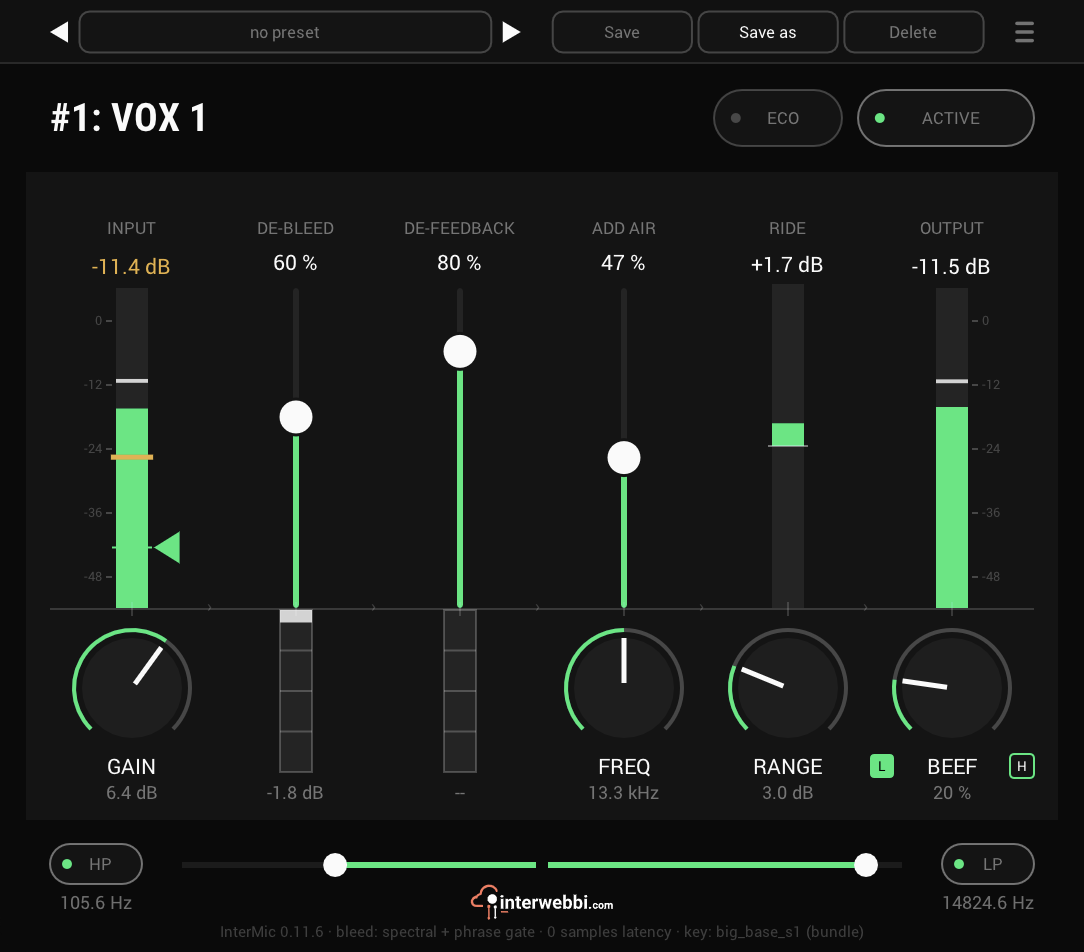
Input and gain
−24 to +24 dB, default 0 dB
The input meter shows what arrives, and answers whether your mic gain is right. GAIN sets the level going in, before anything else.
De-bleed
0 to 100%, default 0%
Removes the music a vocal mic picks up off the stage, causally, without gating the singer. It works between the harmonics of the voice and closes between lines.
De-feedback
0 to 100%, default 0%
Finds acoustic feedback and notches it before it becomes a howl, with up to four notches at once. A notch eases out once its ring dies, but keeps watching for ten seconds, so a returning howl is caught quickly.
Add air
Amount 0 to 100% · Freq 50 to 130% of the LP corner
Puts back the air around a voice. The fader sets how much; FREQ, the knob below it, sets where it starts, and the panel prints the frequency it lands on.
Ride
Range 0 dB (off) to 12 dB
A gain rider that keeps the vocal at its level. RANGE sets how far it may move, and it ducks further than it boosts. The meter above shows how hard it is working.
Output and beef
Beef 0 to 100%, with L and H
The output meter shows what leaves. BEEF adds saturation: L on the body of the voice, H on its top end.
HP and LP
HP 20 Hz to 1 kHz · LP 1 to 20 kHz
A high-pass and a low-pass filter, set by the two handles along the bottom. Each has its own on and off switch.
Eco, Active, presets
ECO swaps de-bleed's model for one half its size, for less CPU and a little less removal. ACTIVE bypasses the whole plug-in.
The preset bar across the top saves, loads, steps through and deletes presets. A preset holds everything, the window size included, and its name gains a star when you change something.